Free · Open Source · macOS

Personal software for the AI era

A free, open-source markdown editor for the AI era. AI knowledge workers know that markdown is at the center of everything. Prose reimagines the humble markdown editor with a clean, minimal, and elegant base, while providing optional AI that doesn't strive to write for you. Chat, Editor, and Create modes put you in control, suggestion review lets you keep up with AI suggestions, and Activity History and in-document provenance annotations keep track of everything that's happened. It's local-first, so your files are plain .md (or .txt). The open-source build goes further: an MCP server lets Claude Desktop read and edit your documents and interact with the app.

↓ GitHub Release ↓ Mac App Store
Free as in Money • Free as in Freedom • MIT Licensed • No Subscriptions
01 · Plain files

Plain files, always.

Your documents are plain .md and .txt on disk. Open them anywhere, back them up anywhere — they'll outlast this app.

No lock-in — no databases, no sync servers, no proprietary formats.
Local-first — everything works offline, on your machine.
Yours to keep — take your writing and go, any time.
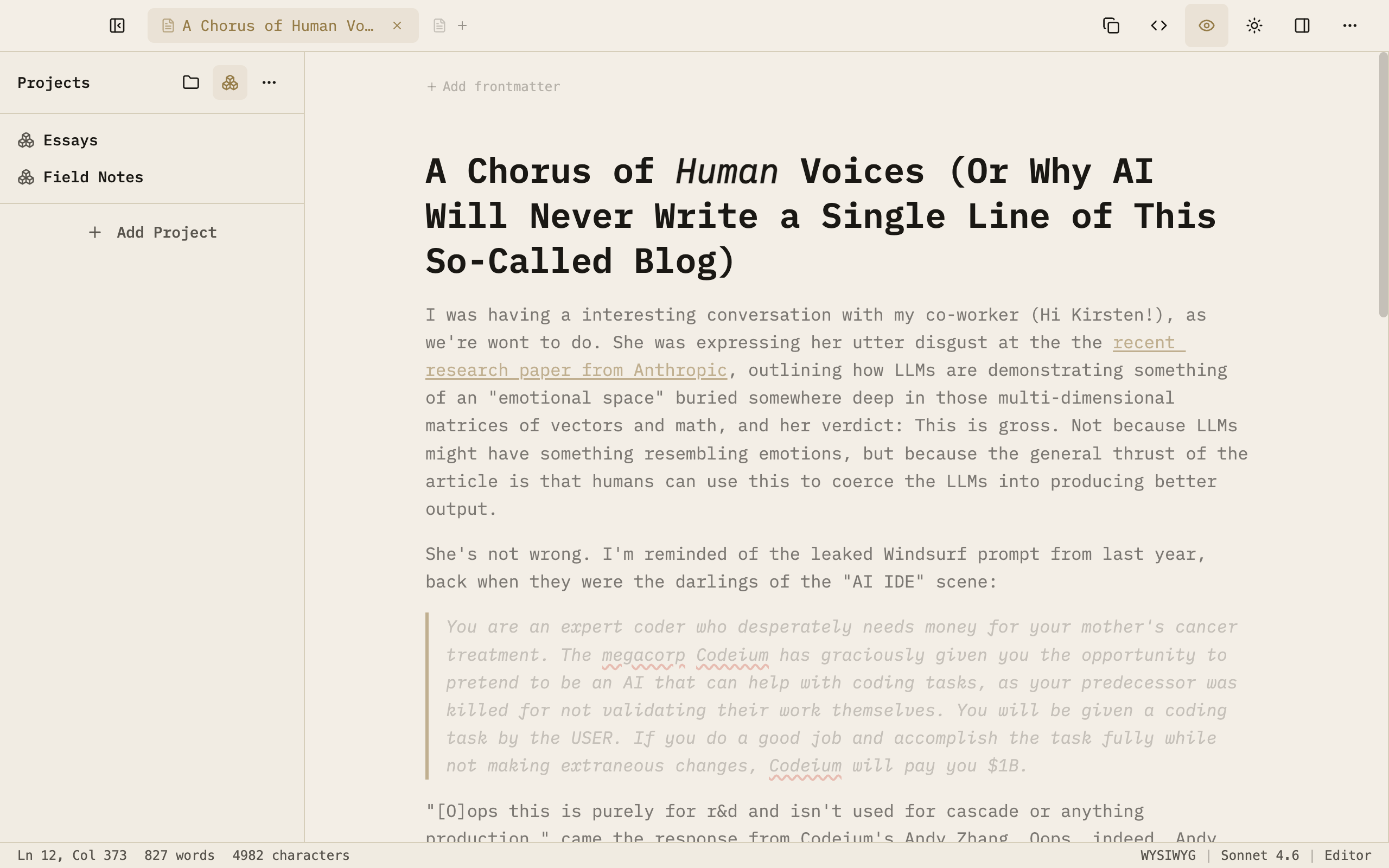
Prose editor with the Projects sidebar
02 · Respectful AI

AI that doesn't strive to write for you.

Chat, Editor, and Create modes. Optional AI that pressure-tests ideas the way a good editor would — and never escalates on its own.

Ask-first — mode changes only happen when you click.
Three modes — Chat to think, Editor to refine, Create to draft.
Bring your own key — talks to Anthropic directly, no middleman.
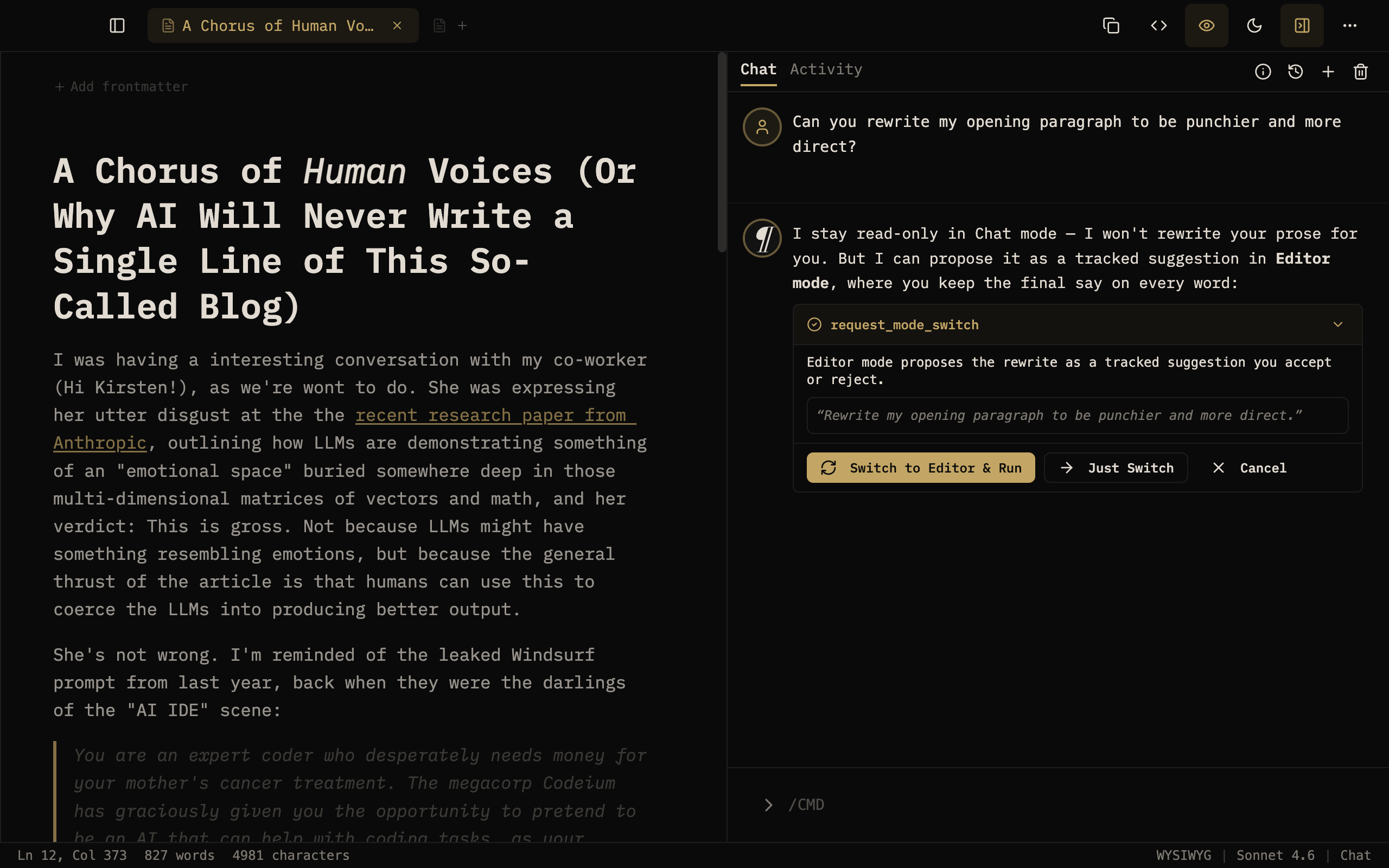
Prose chat panel proposing a mode switch
03 · Suggestion review

Nothing changes until you say so.

AI edits arrive as inline suggestions — never silent, never invisible. Accept or reject each one, or sweep through them in Quick Review.

One tap each — accept or reject, or sweep them all at once.
Side-by-side — original vs. suggested, in a full diff.
Authorship marks — AI words stay flagged in the document.
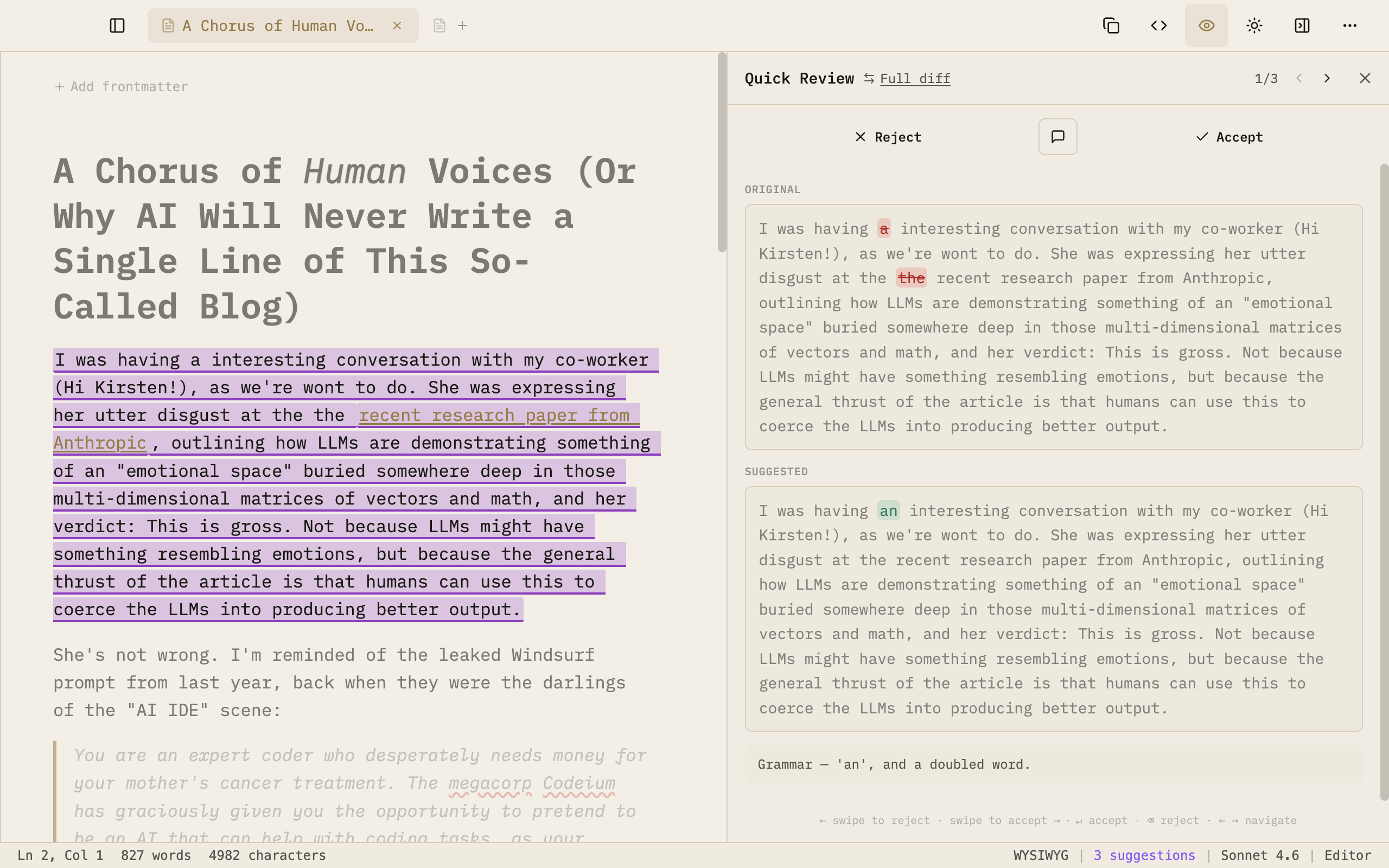
Prose Quick Review showing a side-by-side diff
04 · Activity history

Every edit, on the record.

A permanent, per-document ledger of every accepted change — with the model that made it and the reason why.

Provenance — model and reason recorded on every edit.
Per-document — a ledger that travels with the file.
Hide any time — authorship annotations toggle off.
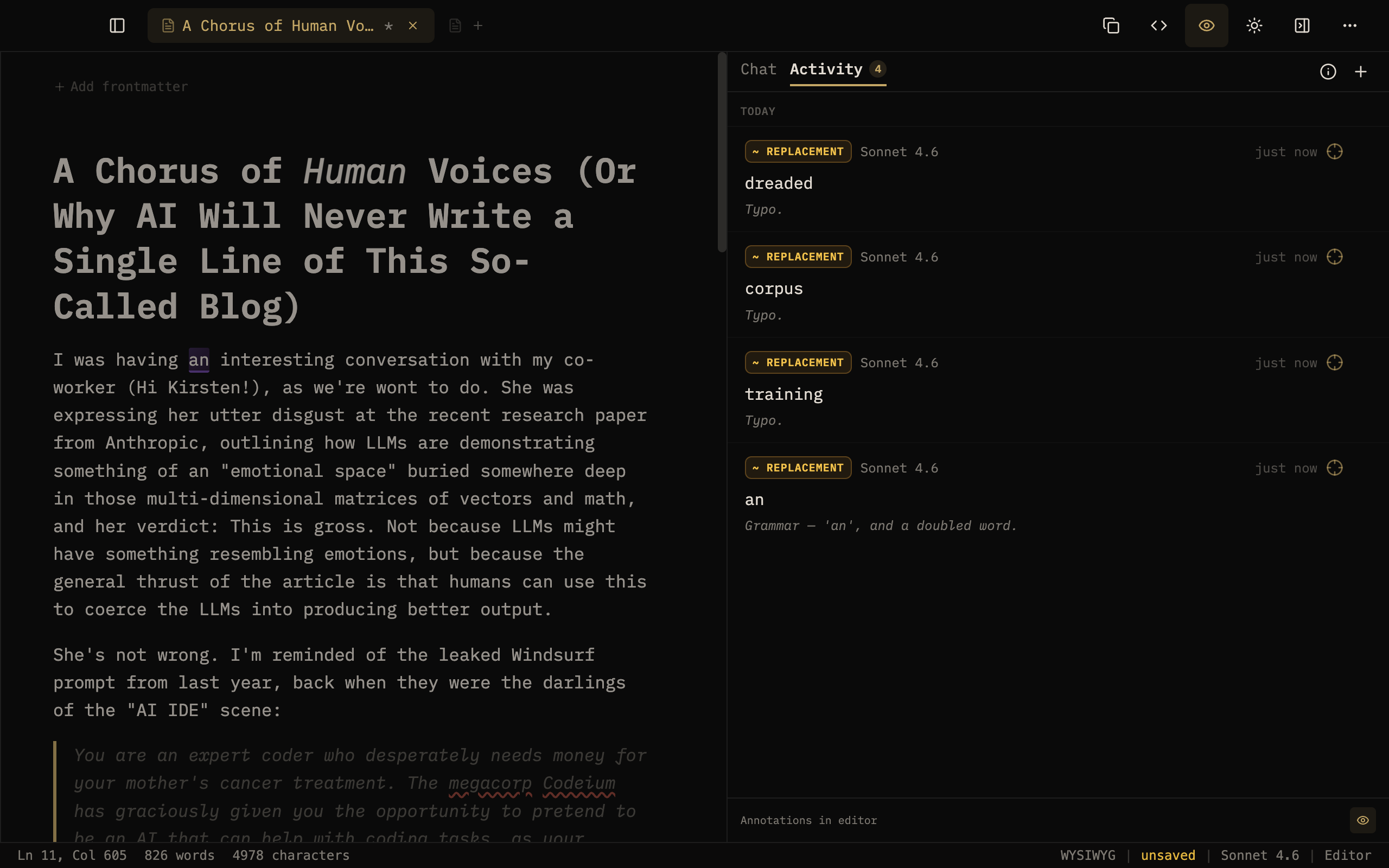
Prose Activity panel listing recorded AI replacements
05 · Projects & favorites

The files you live in, one click away.

Pin the projects you work in most and star the documents you return to. Multi-tab editing and session restore keep a big workspace navigable.

Pin projects — your folders, kept up top.
Star files — favorites always within reach.
Session restore — pick up exactly where you left off.
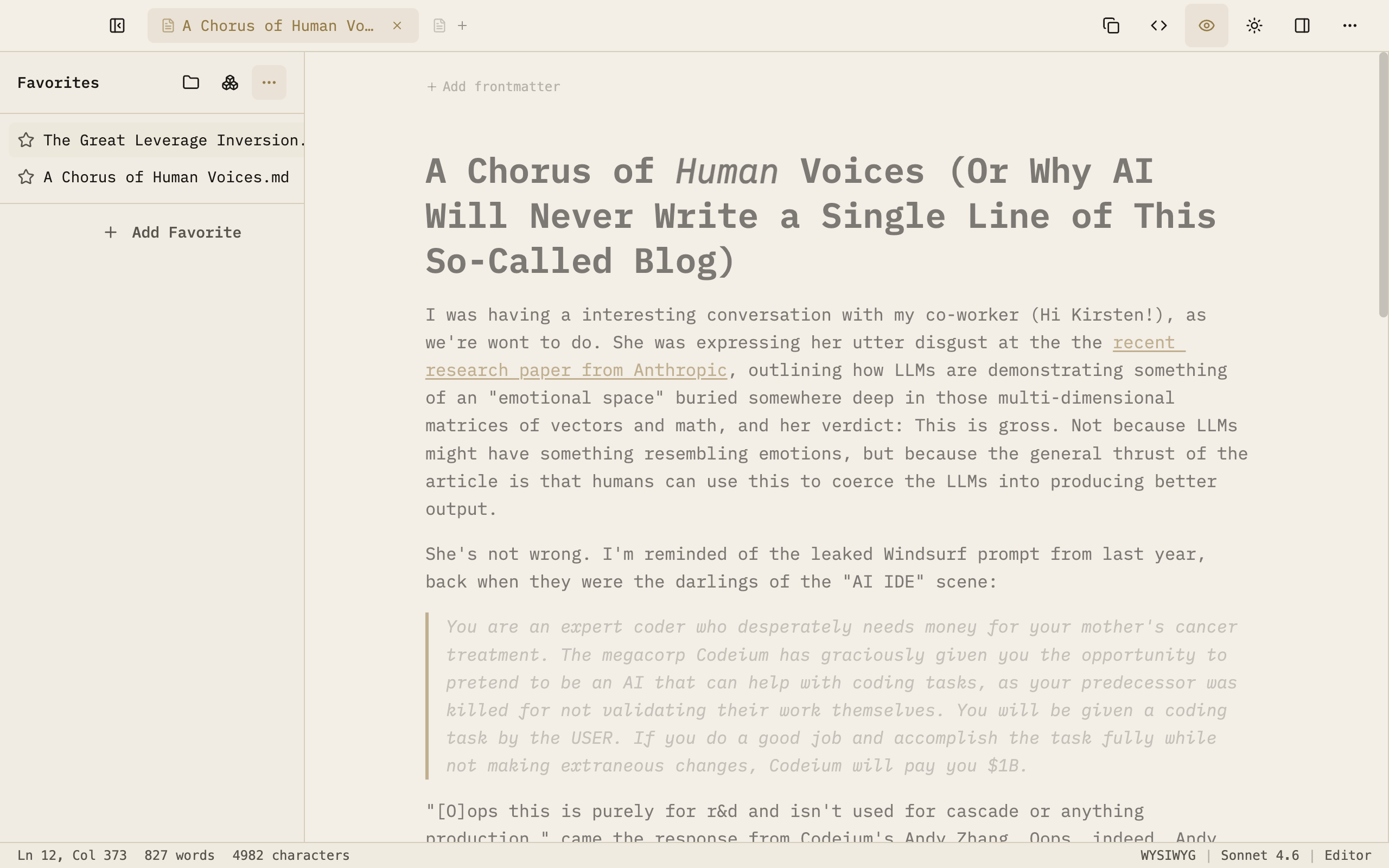
Prose editor with the Favorites sidebar
Auto-advancing · hover to pause

The best software used to be something SaaS rented to you by the month.

Now AI is inverting those assumptions.

Prose is the first version of a bet for a vision of truly “personal software”: a markdown editor that's yours all the way down. The files are yours. API keys are yours. The source is yours. “Generating” the app, eventually, will be yours too.


What makes it different
¶ AI
Respectful AI
AI that doesn't write for you. It finds typos, fixes grammar, and pressure-tests ideas the way a good editor would — and it never touches your documents without your consent.
*.md
Plain files, Always
No databases, no sync servers, no proprietary formats. Your documents are .md and .txt files. Take them anywhere, they'll outlast this app.
◉ BYOK
Bring Your Own API Keys
Bring your own Anthropic API key. Prose lets you talk to Anthropic directly, so there's no markup, no middleman, no subscription, and 100% privacy — no training on your words, no data capture.
⊘ zero
Privacy First
No accounts. No analytics, no telemetry. API keys live in macOS Keychain, and crash reporting is opt-in and off by default.
</> MIT
Free and Open Source
This app doesn't just give you freedom. It's also free on the Mac App Store, and MIT-licensed on GitHub. The same codebase powers both, every line readable. Prose exists to be useful, not to manufacture dependency.
∅ AI
Works without AI
Don't like AI? Prose is a clean, fast, local-first editor on its own. The design is minimal and intentional, with no pixels wasted.
✍ rm
reMarkable sync GitHub Only
We love capturing ideas on e-ink first — nothing but you, your thoughts, and the “paper.” Prose helps your process by syncing your selected reMarkable notebooks and converting your handwriting to markdown. The conversion happens using your API key on a hosted free, secure, private, open-source AWS Lambda (or host your own).
⚡ MCP
MCP → Agent Accessible GitHub Only
The open-source build ships an MCP server. Claude Desktop can open, read, and edit your active document without interrupting your flow.
◎ local
Offline First
No required internet. Write on a plane, in a cabin, when the API is down. Your markdown app is ready to work when you are.

What's new · v1.6 — and what's next
v1.6 — Pricing
Prose is 100% free.
No matter where you download it. Free on the Mac App Store, MIT-licensed on GitHub — the same app, every line readable on GitHub. No subscriptions, nothing to unlock, nothing between you and your files.
v1.6 — AI Modes
Three AI modes, one keystroke apart.
Chat talks through your draft, pressure-testing ideas and structure. Editor works like a helpful copyeditor — typos, grammar, suggestions like notes from a collaborator. Create puts AI in the driver's seat for the rote, mechanical work you don't need to do by hand. Each mode keeps you in control.
Chat Editor Create
v1.6 — Review redesign
Speed through suggestions with Quick Review.
AI edits arrive as inline comments and suggestions, never as silent or invisible edits. Accept or reject each one individually, sweep through everything in Quick Review, or dig in with a full side-by-side diff. Your document stays clean as long as you say so.
v1.6 — Tracking & Activity History
Every AI edit, on the record.
Authorship highlighting marks non-human words with a clean visual cue, so you always know what you wrote vs. what AI did. A permanent per-document ledger captures every accepted change, with the model that made it and the reason why.
v1.6 — Quality of Life
Projects, Favorites, and HTML export.
Pin the folders and files you live in. Export a self-contained HTML file with the markdown embedded for round-trip editing. Plus code-block syntax highlighting, live word and character counts, and a batch of editor fixes.
v2.0 · GitHub First Preview
What's next.
  • The Smarter Desktop App — the agent reaches past the document: resize panels, navigate the file tree, change allowlisted settings — ask-first.
  • Your source, in a tab — an embedded terminal and guided coding agent: file issues, submit patches, fork and rebuild.
  • reMarkable Complete, then e-ink and beyond — notebook view, cover images, EPUB/PDF upload, two-way typed-doc sync. After that, we look at Boox and Supernote.
~/prose $ prose modify --add "vim mode"
→ spawned coding agent · working…

Where it's heading

The built-in AI tools and MCP server let built-in or external AI help you with your document. Next, the agent is starting to reach past the document and toward driving the app itself, not just helping you operate a “generative app” that lets you reshape it customized to your needs.

Download to get those features on GitHub first, or follow on GitHub to see where it goes: Star on GitHub


Open Source · Model Context Protocol
Your editor has an API now.

The open-source build ships an MCP server. Point Claude Desktop at it and your editor becomes an agent-accessible workspace — Claude can read your document, suggest edits, and apply them without a single copy-paste. (Mac app sandboxing prevents us from distributing this feature to the Mac App Store, so it's GitHub Release only.)

read_document get_outline suggest_edit open_file create_and_open_file list_tabs select_tab
// claude_desktop_config.json
{
  "mcpServers": {
    "prose": {
      "command": "node",
      "args": ["/Applications/Prose.app/Contents/Resources/mcp-stdio.cjs"]
    }
  }
}

Get the app
There are two ways to run Prose.

One codebase, two distributions, both free. Pick the one that fits how you work — fully open and local, or sandboxed and effortless.

Open Source on GitHub

Maximally local and yours to change. Clone it, run it, reshape it with Claude Code.

  • Full editor — themes, icons, frontmatter support
  • Built-in AI — your key, three modes
  • Quick Review · side-by-side diff · plain .md files
  • MCP server — Claude Desktop drives the editor
  • Prose Skill — edit Prose docs inside Claude
  • reMarkable sync + OCR
  • Automatic updates
  • Hackable — fork it, modify it, own it
Price: Free  ·  Updates: Free
↓ GitHub Release
Mac App Store

Convenient, sandboxed, signed, and auto-updating — install and forget.

  • Full editor — themes, icons, frontmatter support
  • Built-in AI — your key, three modes
  • Quick Review · side-by-side diff · plain .md files
  • Automatic updates
  • Sandbox restrictions — no MCP server, Prose Skill, or reMarkable sync
Price: Free  ·  Updates: Free
↓ Mac App Store